How-to
Stream Defender XDR events to LogScale through Azure Event Hubs
Microsoft · v1 · @sebastian · 13.9.2026
Send selected Microsoft Defender XDR Advanced Hunting events to Azure Event Hubs and validate a Falcon LogScale Azure Ingest Feed in a test environment.
Draft status — test tenant required. This guide covers Defender XDR event streaming, not Microsoft 365 Unified Audit Log polling. Validate the end-to-end feed, parsing, queries, costs, and screenshots before publication.
Goal
An isolated Windows test endpoint produces selected Defender XDR Advanced Hunting events. Microsoft Defender forwards those events to Azure Event Hubs, and a LogScale Azure Ingest Feed consumes the hub into a dedicated repository.
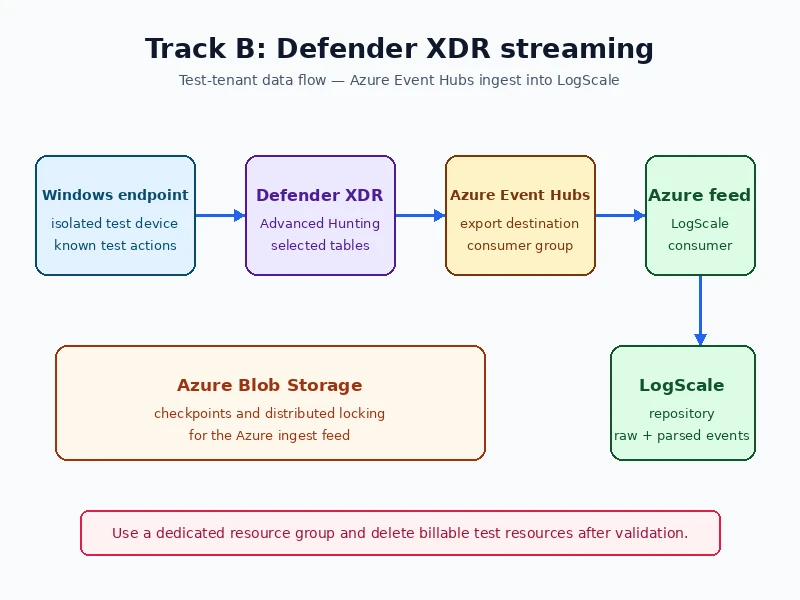
Windows test endpoint
  → Defender for Business / Defender XDR
  → Streaming API (selected Advanced Hunting tables)
  → Azure Event Hub
  → LogScale Azure Ingest Feed
  → dedicated LogScale repository
This is separate from Microsoft 365 Unified Audit Log polling. Choose this path when the outcome is Defender endpoint telemetry, such as device, file, registry, network, and sign-in events, rather than Office 365 Management Activity API audit records.[1]
Email-security telemetry is available only when the tenant exposes the corresponding Advanced Hunting and Streaming API tables. Defender for Office 365 Plan 2 provides Advanced Hunting; do not assume Business Premium / Plan 1 exposes EmailEvents.[11][12]
Prerequisites
- An isolated Microsoft 365 Business Premium trial or another tenant with a Defender for Business/Defender XDR entitlement
- An Azure subscription for Event Hubs and Blob Storage
- A LogScale instance where you can create a repository, Azure Ingest Feed, and parser
- Permission to create Azure resources, grant Entra application consent, and assign Azure roles
- A Windows test endpoint that can be onboarded to Defender
Validate the configuration in a non-production environment before production rollout. Generate only safe, documented test activity, and do not expose organisational usernames, hostnames, event payloads, client secrets, or ingest tokens in screenshots.
Optional — Create the isolated test environment
Skip this setup when suitable test identities and an onboarded endpoint already exist. Create a test tenant with an active Defender entitlement. Microsoft documents that Microsoft 365 Business Premium includes Defender for Business, and that Defender for Business supports streaming selected Advanced Hunting data to Azure Event Hubs.[1][2][10]
Create two test identities:
- a tenant administrator for app consent and Azure configuration; and
- a normal test user for routine endpoint activity.
Onboard a dedicated Windows test endpoint. Keep the tenant administrator out of day-to-day test activity so the events and screenshots remain easy to explain and safe to publish.
Expected result: You can sign in with the normal test user and the test endpoint appears in the Defender portal.
LogScale can consume Azure Event Hubs directly; it polls the hub in batches. Microsoft Defender is a documented source for this feed. Do not use the microsoft/microsoft365 Marketplace collector for this path: that integration currently focuses on Microsoft 365 email-security events.[3][6]
Step 1 — Create Azure resources and access
Use your organisation's Azure naming convention. Resource names cannot be changed after creation; group resources with the same lifecycle in one resource group and use tags for metadata that can change. For example, a team that uses resource abbreviations, workload, environment, region, and instance might name this group rg-logscale-ingest-prod-weu-001.[8]
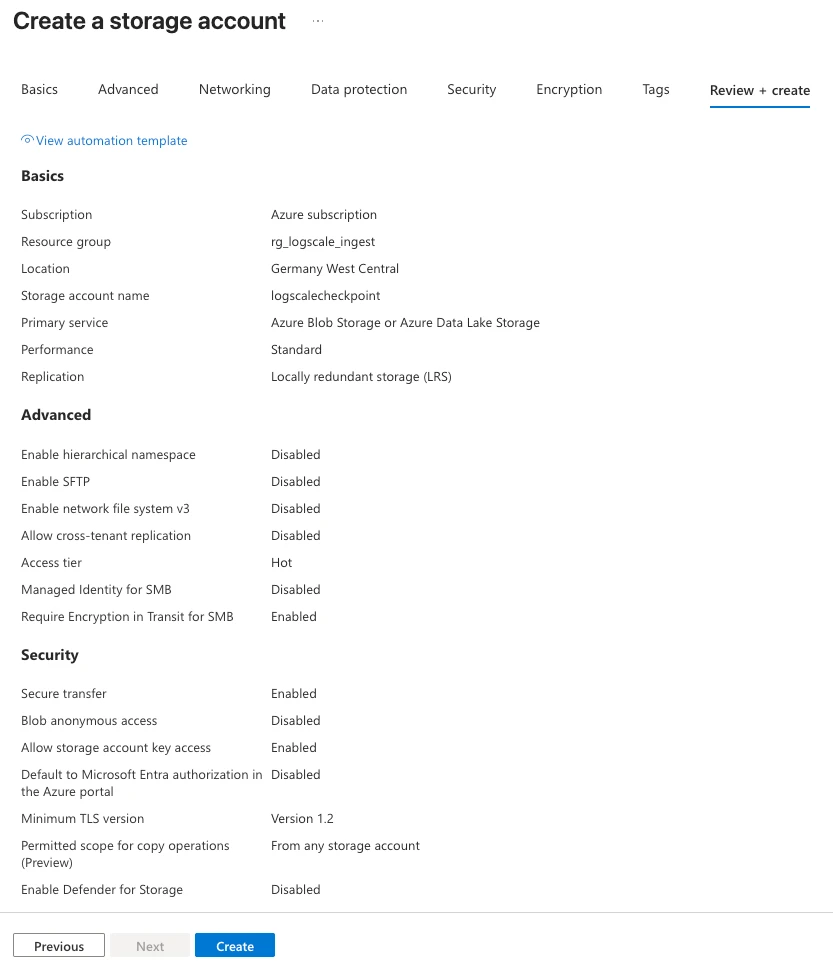
- Create a dedicated Azure resource group for the Event Hub, Storage Account, and LogScale service principal.
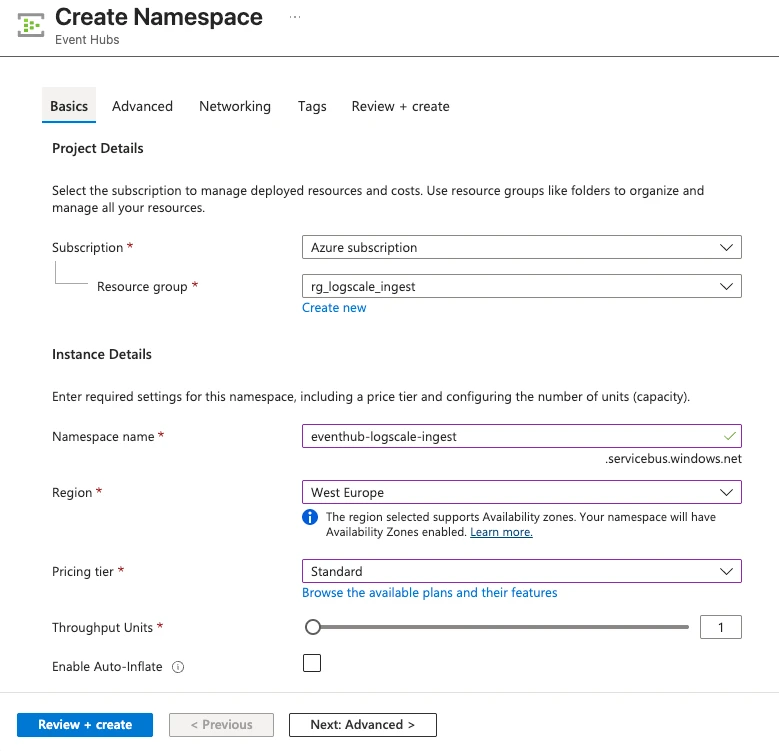
- Create an Event Hubs namespace in that group. Select Standard so that you can create a dedicated consumer group.
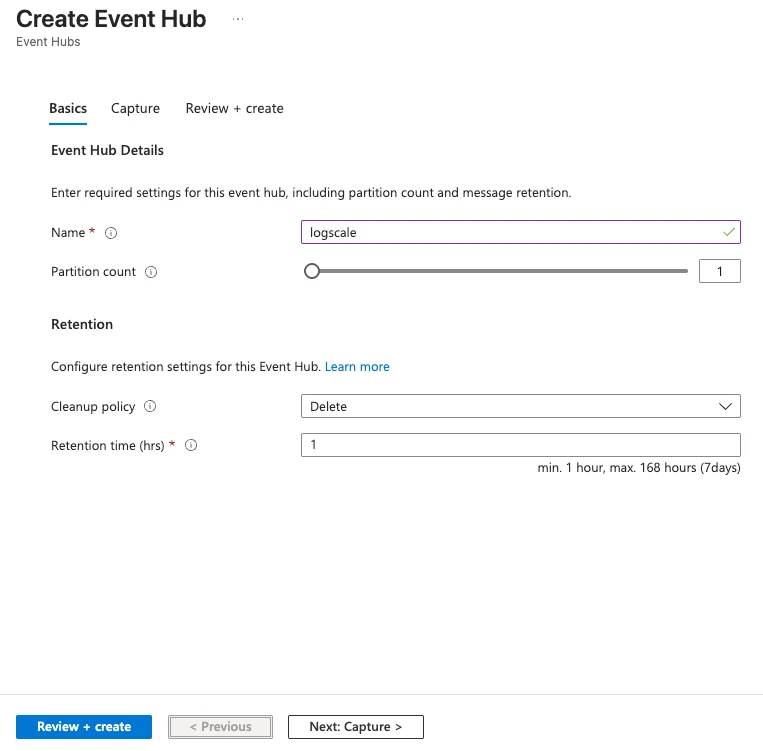
- Create one Event Hub in the namespace. Choose partition count and retention to match your expected volume and recovery window; the screenshot shows small test settings.
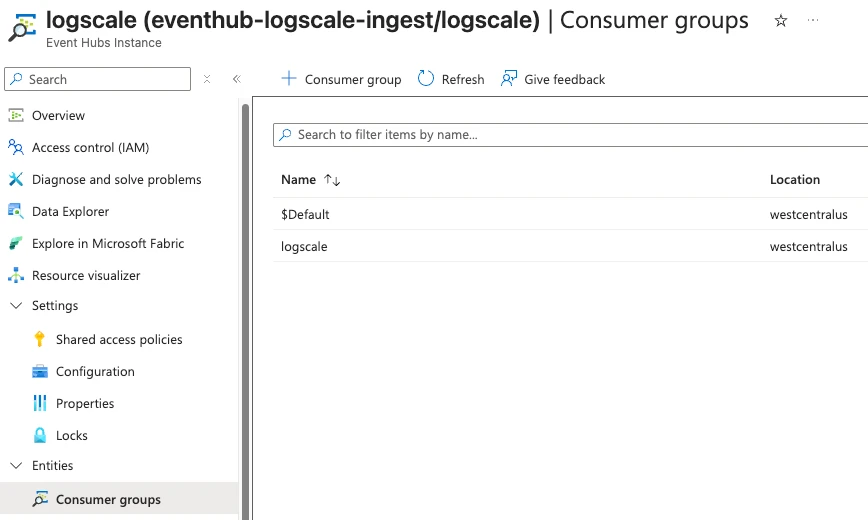
- Open Consumer groups and create a dedicated group such as
logscale. Do not use$Defaultfor the LogScale feed.
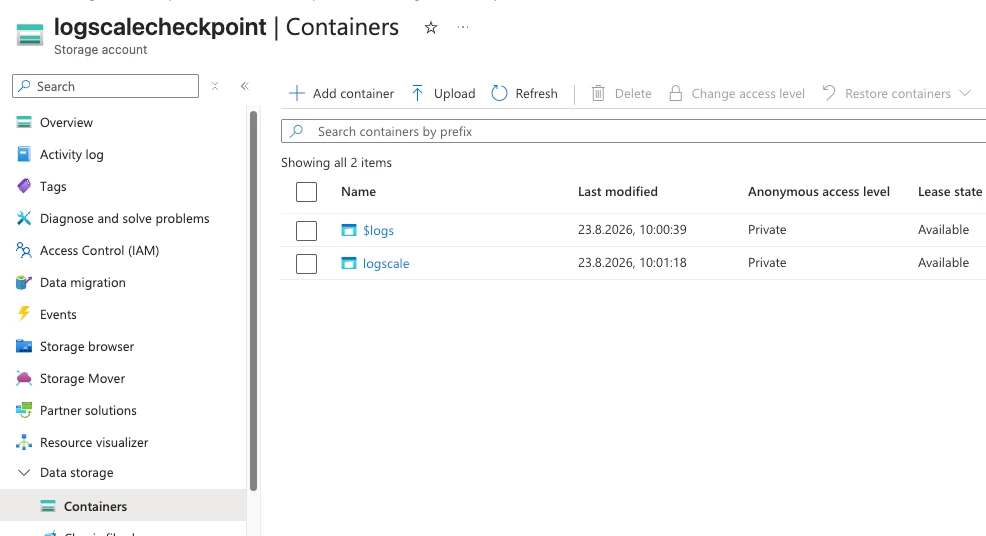
- Create a Standard Storage Account in the same resource group, then create a private Blob container for LogScale checkpoints and distributed locking.
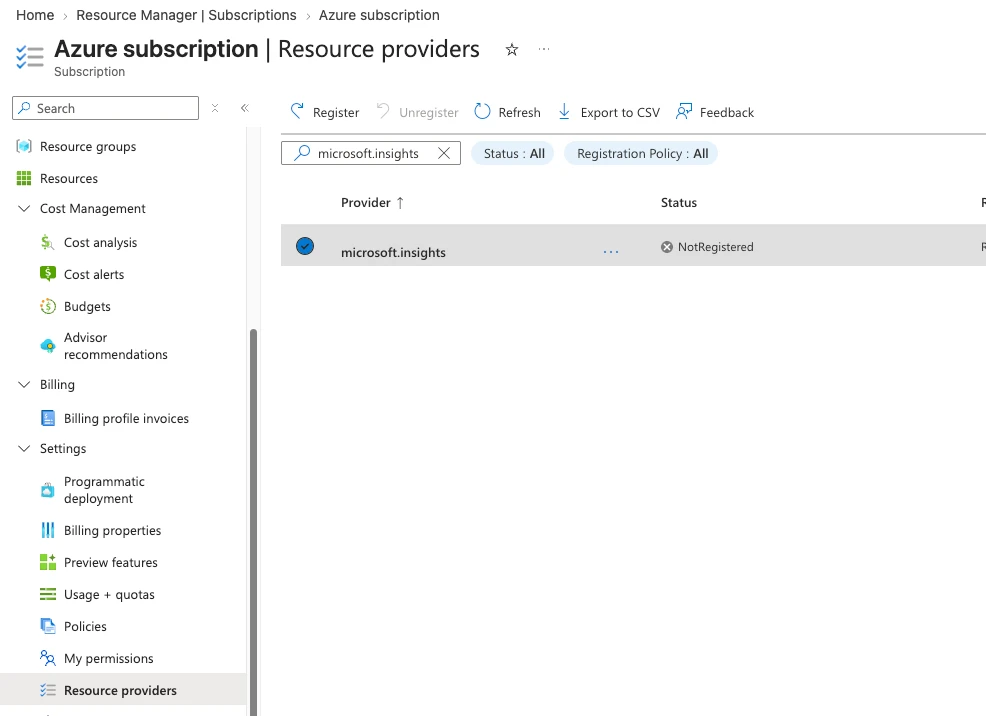
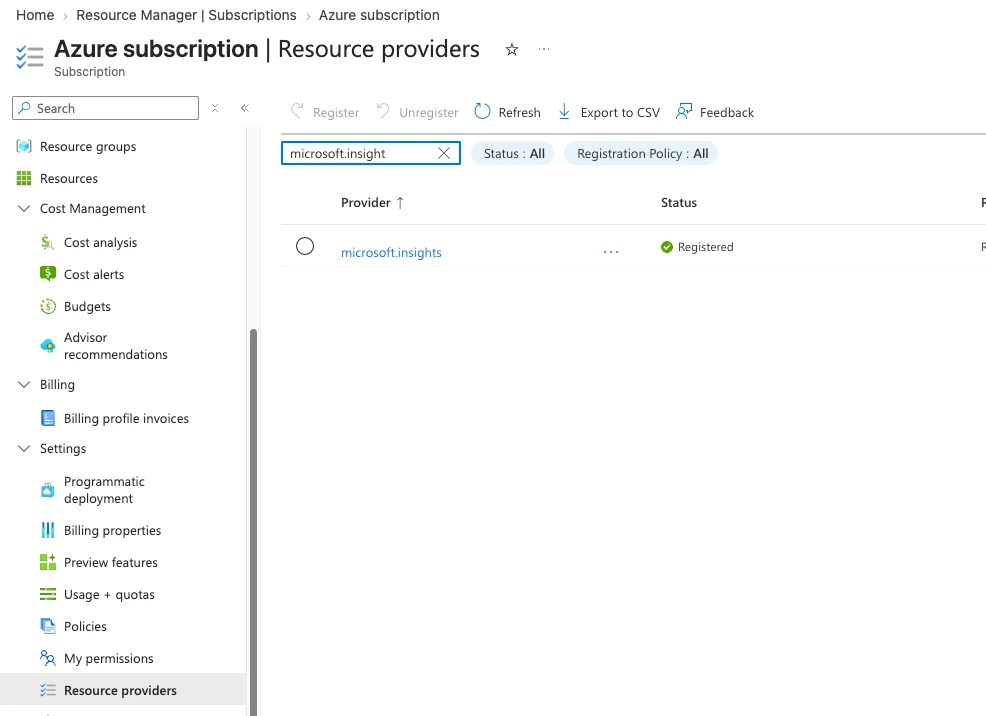
- Open the Azure subscription's Resource providers, find
Microsoft.Insights, and select Register. Wait until the status is Registered.
- Create a dedicated, single-tenant Entra app registration for the LogScale feed. In a test tenant, you can reuse an existing app; in production, use a separate app so this feed has only its required Azure roles. Create a client secret and store its value securely; the value is shown only once.
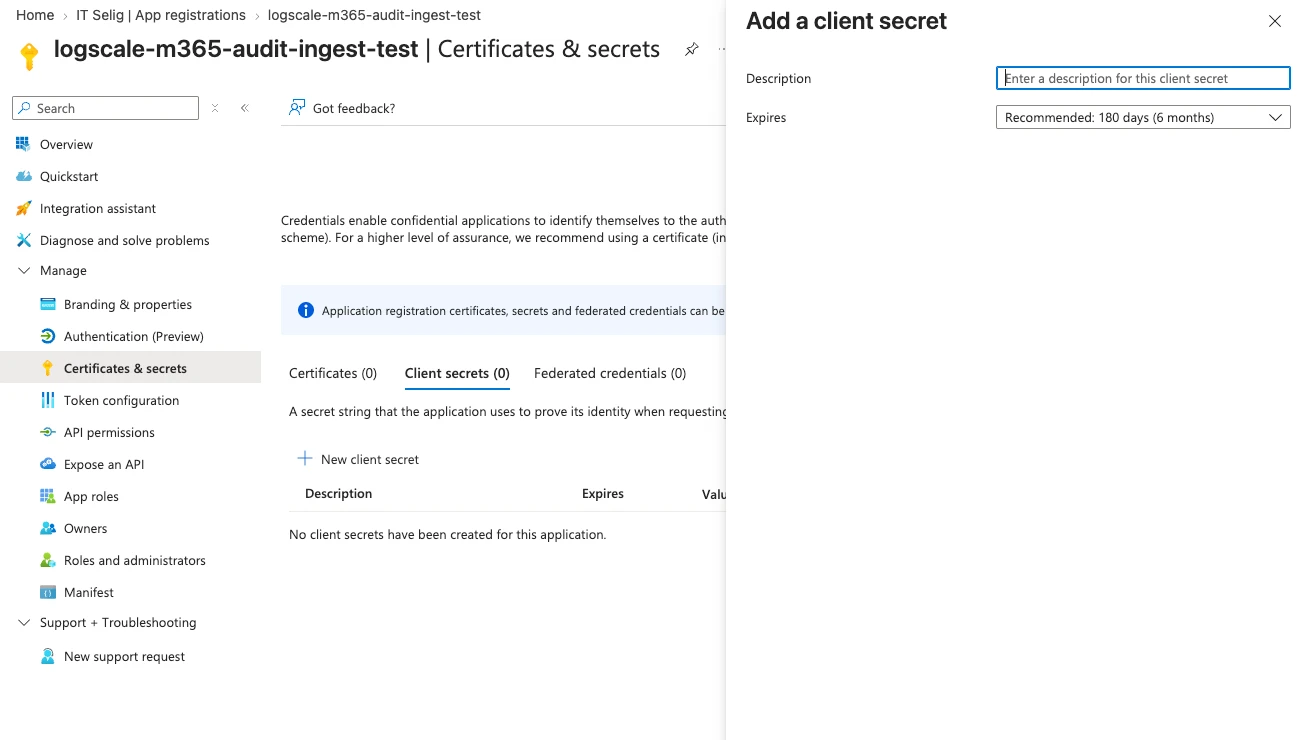
-
Assign these roles to the app's service principal:
- Contributor on the Event Hubs namespace. LogScale uses this to discover partitions and Event Hub properties.
- Azure Event Hubs Data Receiver on the specific Event Hub. This grants the Event Hubs data-plane receive permission.
- Storage Blob Data Contributor on the Storage Account. This lets LogScale create checkpoints and distributed locks.[3][9]
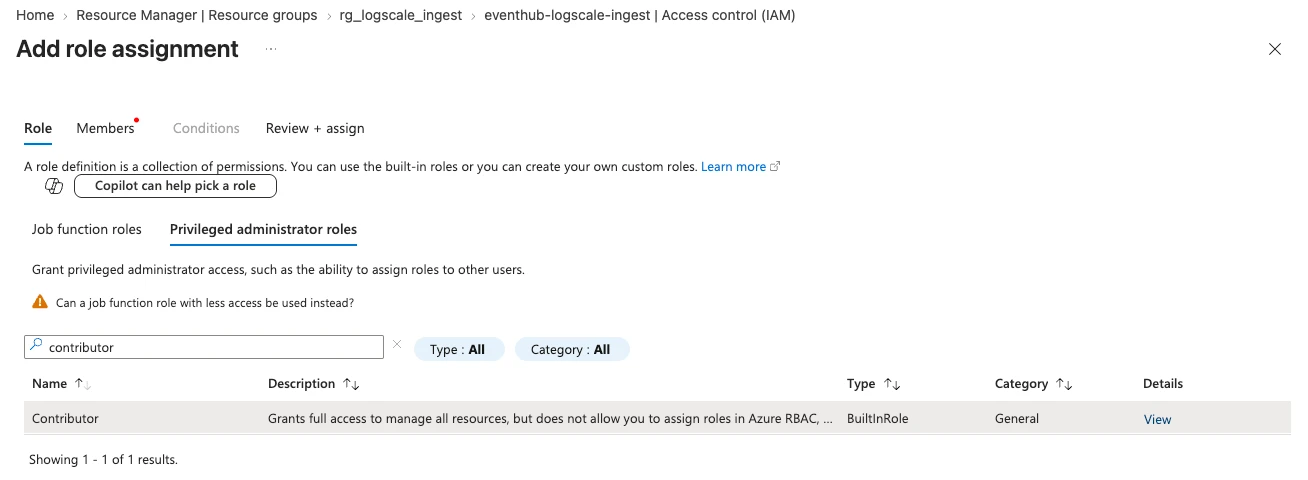
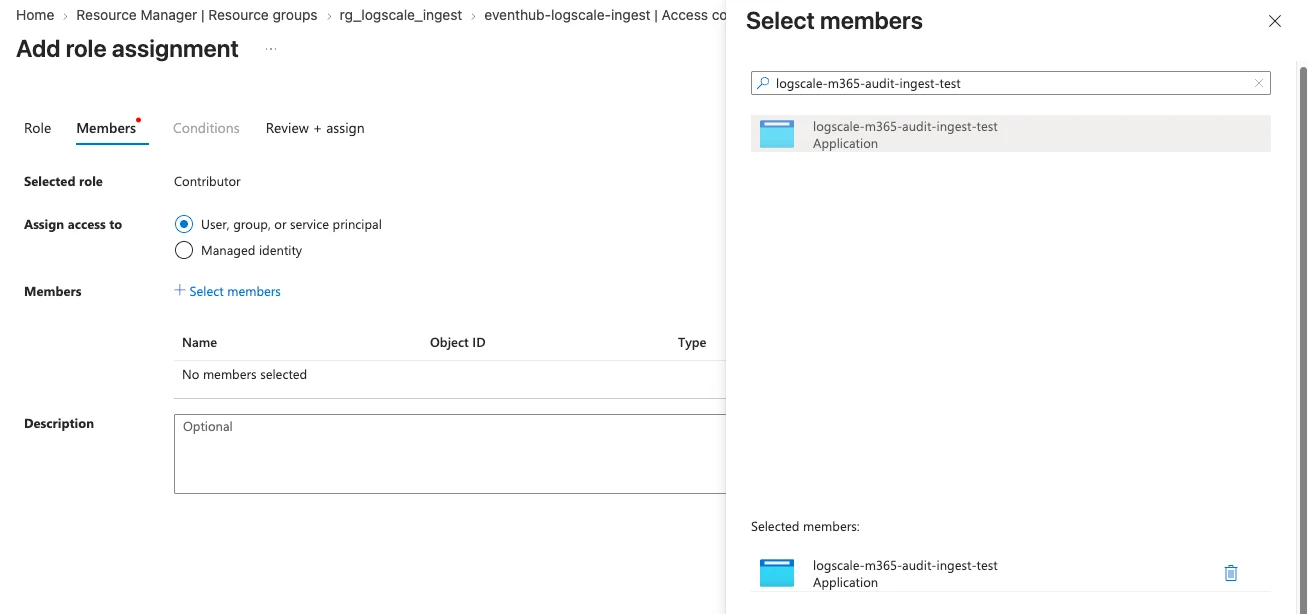
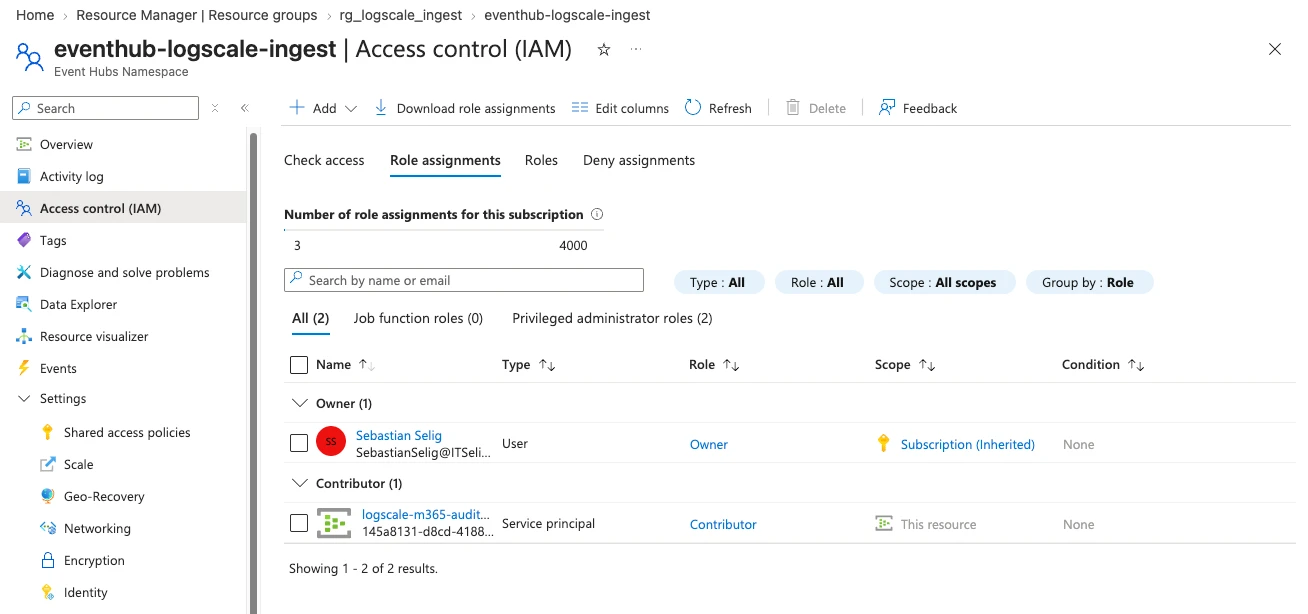
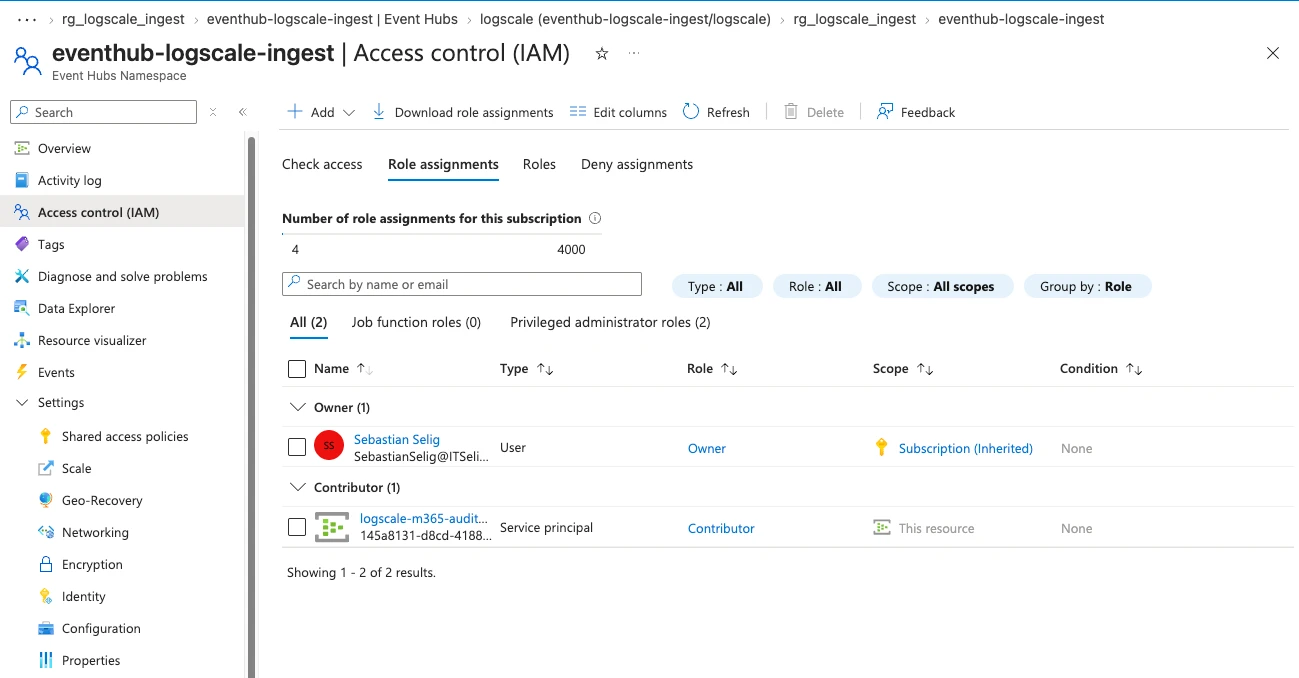
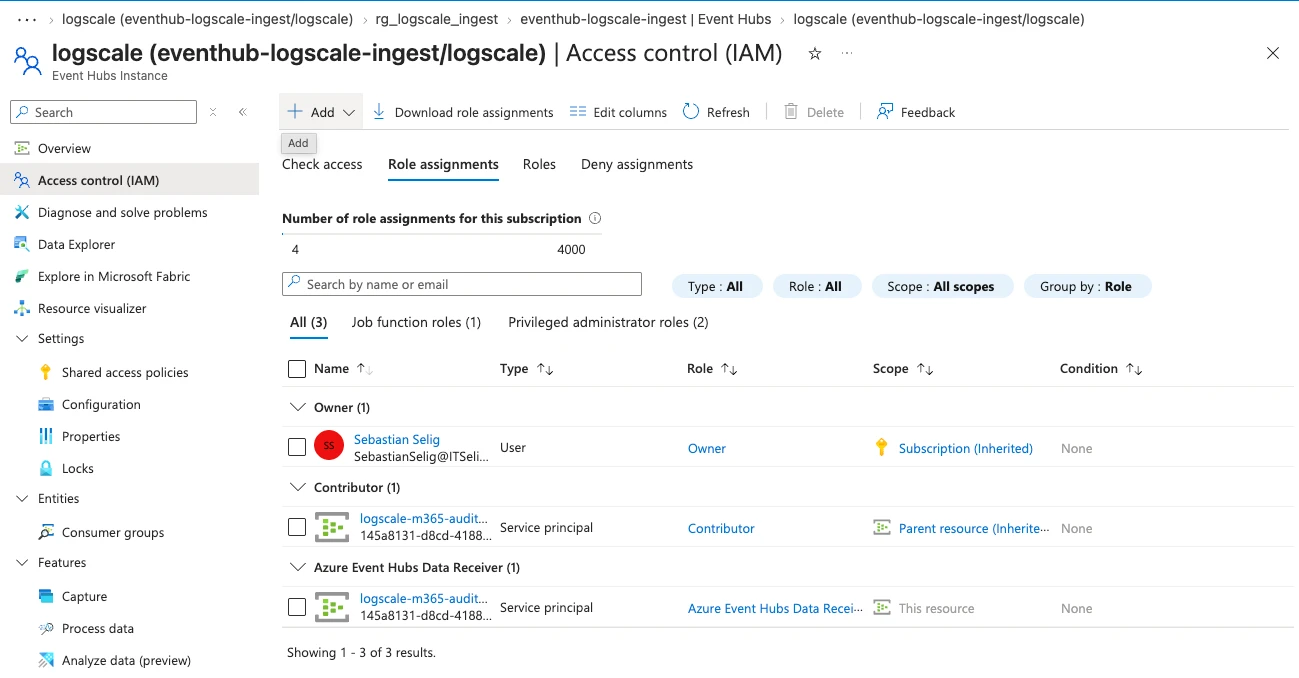
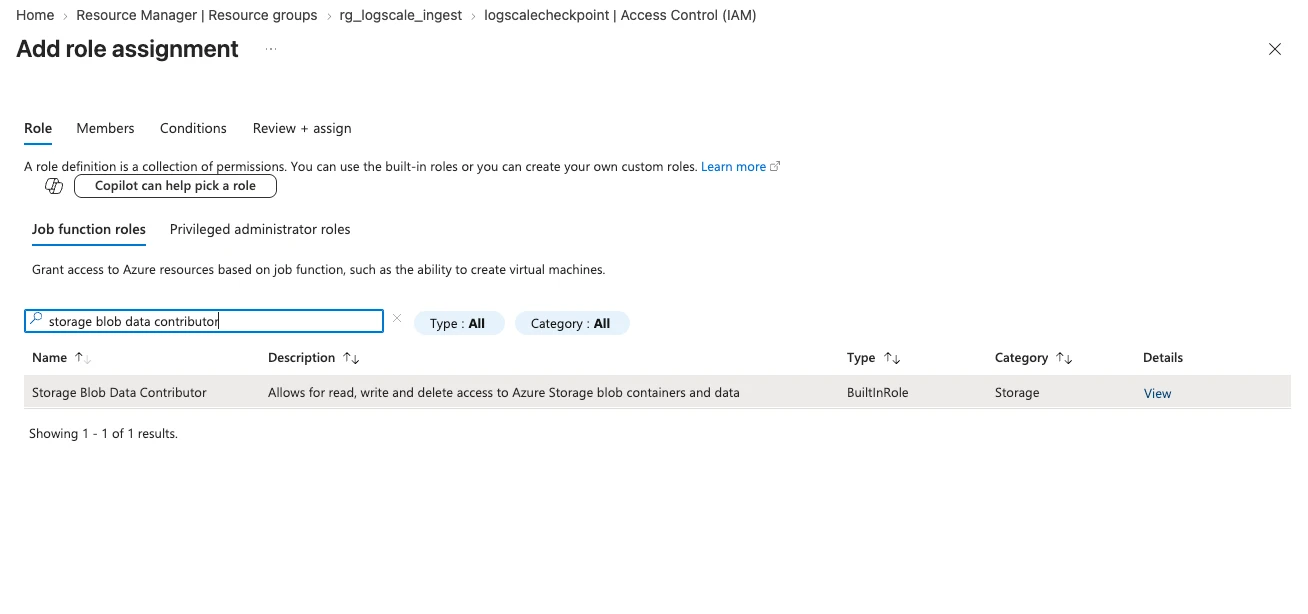
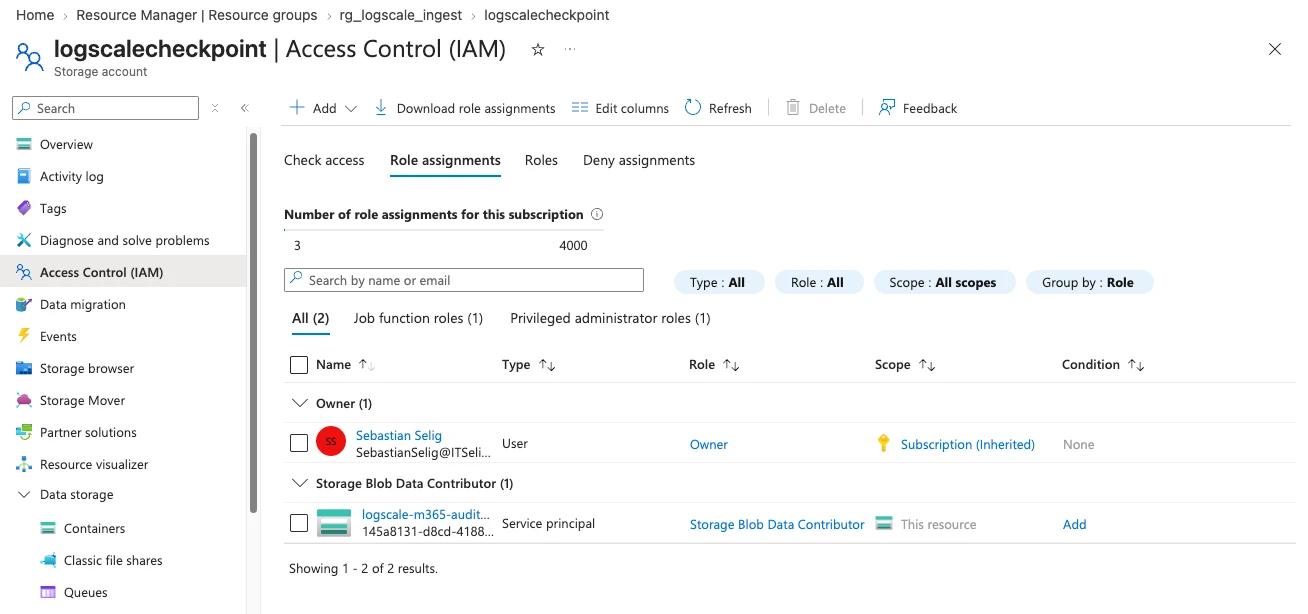
For a single LogScale consumer during a short test, an Event Hubs Basic namespace and its $Default consumer group can be sufficient. Basic permits only that one consumer group; use Event Hubs Standard and a dedicated consumer group before adding another consumer such as Sentinel or a debugging application.[4][7]
Step 2 — Configure the LogScale Azure Ingest Feed
In the target LogScale repository, open Settings → Ingest feeds → New ingest feed → Azure.[3][5]
- Enter a descriptive feed name and select the
microsoft/microsoft365parser used by the Microsoft 365 package. - Set Preprocessing to Split by Azure records. Defender sends a
recordsarray; splitting by lines would not create one LogScale event per Defender record.[2][5]
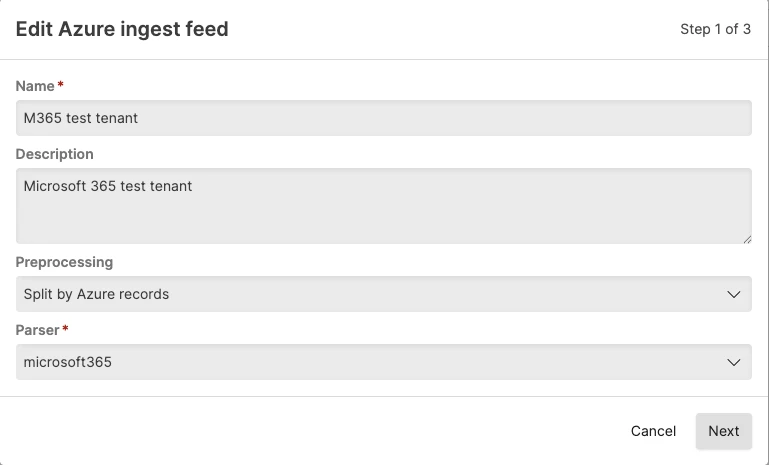
- Enter the fully qualified namespace, Event Hub name, dedicated consumer group, Blob Storage endpoint, and Blob container. Use the Earliest checkpoint only when you deliberately want to replay available test data. For a new production feed, use Newest so it starts with new events.[5]
- Enter the Entra tenant ID, application (client) ID, and the client-secret value. Select Enable Azure ingest feed, then select Test Azure feed. Save only after the test succeeds.
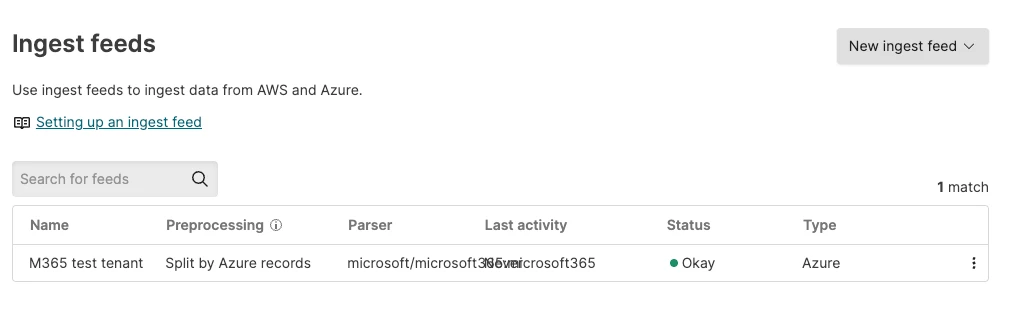
Do not include the tenant ID, client ID, secret, Event Hub connection details, ingest token, or raw production payloads in the article repository or screenshots.
→ Expected: status is Okay and LogScale can read the Event Hub and write to its checkpoint container.
Step 3 — Forward Defender events to the Event Hub
New Defender tenants can temporarily show a provisioning screen. Wait until the Defender XDR portal finishes preparing the data spaces before configuring the export.
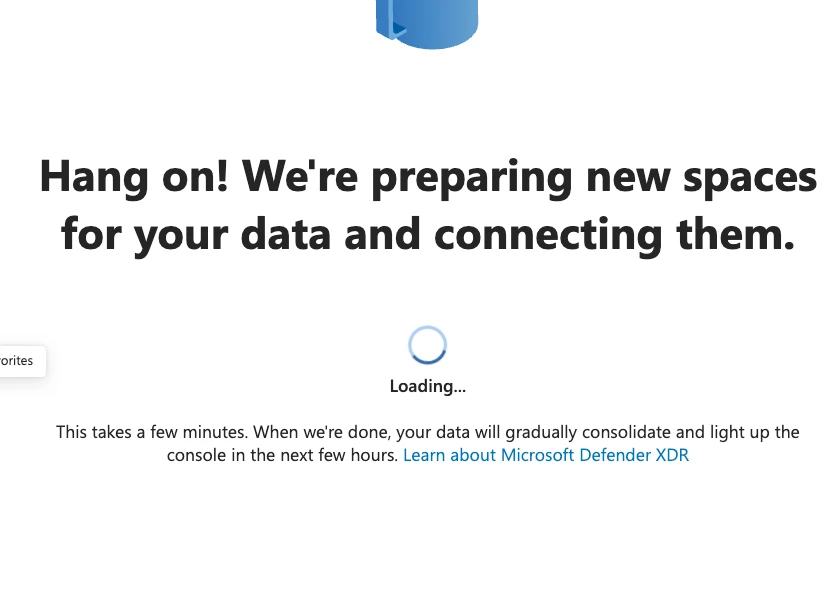
After provisioning, open https://security.microsoft.com/settings/mtp_settings/raw_data_export. Depending on the Defender experience and licence, this page is labelled either Streaming API or Data export settings. Select Add or Add data export settings, choose Forward events to Azure Event Hub, enter the Event Hub name and namespace resource ID from Azure, then select only Advanced Hunting tables needed for the test. Save the export configuration.[2]
For the first endpoint test, select AlertInfo, DeviceProcessEvents, and DeviceEvents. This creates a small, useful initial stream: Defender alerts, process activity, and general device events. Add DeviceNetworkEvents for network/DNS tests and DeviceFileEvents for file-action tests only when those events are needed.
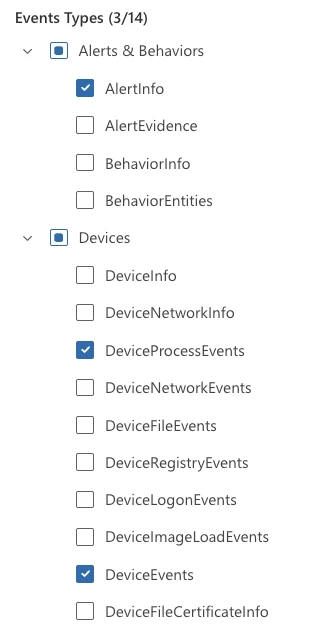
The available tables are tenant- and licence-dependent. In this test tenant, the complete list contains 14 Alert and Device tables; no Email tables are available. Do not use sent test emails to validate this streaming configuration when the portal does not offer Email event types. Validate it with an onboarded endpoint instead.
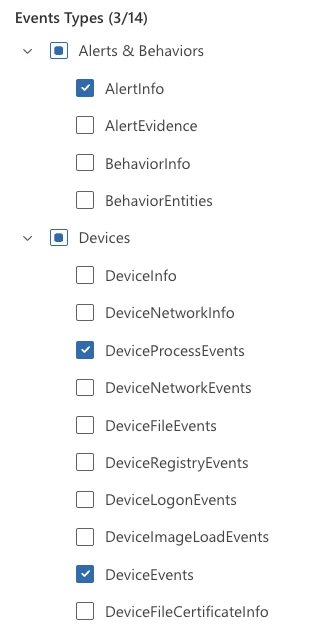
→ Expected: Defender saves an export targeting the named Event Hub. Event Hub name and namespace resource ID match the Azure resources created in Step 1.
Step 4 — Generate and verify known test events [test required]
Use the normal test identity and endpoint to generate a small, timestamped event set:
- successful and failed sign-in;
- a process start;
- a DNS or network connection; and
- a test-file action.
Write down the approximate time, action, actor, and expected event table before generating each event. First verify that raw payloads reach LogScale. Preserve the source event, then extract only fields that are confirmed by the real payload.
The final article should include a small parser example, a screenshot of parsed events, and two or three tested queries. Do not publish placeholder parser logic, queries, or a dashboard that has not been checked against the captured events.
Expected result after testing: Every known action can be found in LogScale and traced to the corresponding Defender event.
Cost and cleanup boundary
Event Hubs and Blob Storage are Azure billable resources. A Business Premium trial plus an Azure free account can be suitable for a short test, but this guide must not promise that either remains free, that repeated trials are available, or that test credentials can be reused.
Delete the Event Hubs namespace and the test resource group after validation if they are no longer needed. Review trial auto-renewal and Azure cost controls before leaving the environment running.
Troubleshooting to document during testing
Do not invent troubleshooting advice. Capture the actual error, cause, and fix from the test tenant. Validate these likely areas:
- Defender export succeeds but the test endpoint produces no selected event type;
- the Event Hub can be read manually but LogScale lacks Azure or Blob permissions;
- checkpoints prevent replay after a feed configuration change; and
- LogScale accepts events but fields are not parsed as expected.
Verification checklist before publishing
- Business Premium/Defender for Business entitlement is active and a test endpoint is onboarded
- Azure Event Hub, Blob container, and LogScale service principal exist in a dedicated test resource group
-
Microsoft.Insightsis registered; namespace Contributor, Event Hub Data Receiver, and Storage Blob Data Contributor roles are assigned - Selected Advanced Hunting event tables reach the Event Hub
- LogScale Azure Ingest Feed reads the hub and writes checkpoints to Blob Storage
- Raw payload, parser, and at least two useful queries are verified against timestamped endpoint actions
- Azure billing, cleanup, and any trial auto-renewal have been planned; unused test resources are deleted
- All screenshots use synthetic test data and contain no secrets
- The article status is updated from
research-drafttodraft
Sources
[1] https://learn.microsoft.com/en-us/defender-xdr/streaming-api-event-hub — Stream Microsoft Defender XDR events to Azure Event Hubs
[2] https://learn.microsoft.com/en-us/defender-business/mdb-streaming-api — Use the streaming API with Microsoft Defender for Business
[3] https://library.humio.com/logscale-gdi/ingesting-data-ingest-feeds-azure.html — Ingest Data from Azure Event Hubs
[4] https://learn.microsoft.com/en-us/azure/event-hubs/event-hubs-features — Event Hubs features and terminology
[5] https://library.humio.com/falcon-logscale-cloud/ingesting-data-ingest-feeds-azure-add.html — Set up a New Azure Ingest Feed
[6] https://library.humio.com/integrations/integrations-microsoft-microsoft365.html — Microsoft 365 integration package
[7] https://learn.microsoft.com/en-us/azure/event-hubs/resource-manager-exceptions — Basic Event Hubs consumer group limit
[8] https://learn.microsoft.com/en-us/azure/cloud-adoption-framework/ready/azure-setup-guide/organize-resources — Organize Azure resources effectively
[9] https://learn.microsoft.com/en-us/azure/event-hubs/authenticate-application — Authenticate an application with Microsoft Entra ID to access Event Hubs resources
[10] https://www.microsoft.com/de-de/microsoft-365/business/microsoft-365-business-premium — Microsoft 365 Business Premium
[11] https://learn.microsoft.com/en-us/office365/servicedescriptions/office-365-advanced-threat-protection-service-description — Microsoft Defender for Office 365 service description
[12] https://learn.microsoft.com/en-us/defender-office-365/mdo-data-retention — Microsoft Defender for Office 365 data retention
Version history
By default each save after the first publish creates a new version. Drafts stay on v1. Overwrites update the current version in place. Open any version to view or download it.